Want to unlike a Facebook page? This guide will show you how to do it.
First you should go to the page you want to unlike. You can do this in two different ways:
By looking for it using the search box at the top of your page.
By clicking on the Likes box that is among the boxes that are right under your name and big cover picture.
Once you are in the page you want to unlike, click on the gear icon that is located at the right hand extreme below the big cover picture and then, in the appearing menu, click on the “Unlike” option.
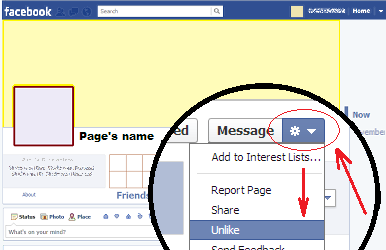
This way the task will be finished.
Although this method we have seen is good to unlike only one page, you may find it uncomfortable if you are trying to remove yourself from many of them. In that case, click here to see a guide on how to unlike multiple pages quickly on Facebook.
First you should go to the page you want to unlike. You can do this in two different ways:
By looking for it using the search box at the top of your page.
By clicking on the Likes box that is among the boxes that are right under your name and big cover picture.
Once you are in the page you want to unlike, click on the gear icon that is located at the right hand extreme below the big cover picture and then, in the appearing menu, click on the “Unlike” option.
This way the task will be finished.
Although this method we have seen is good to unlike only one page, you may find it uncomfortable if you are trying to remove yourself from many of them. In that case, click here to see a guide on how to unlike multiple pages quickly on Facebook.